Cat5e vs Cat6 vs Cat6a: Which Ethernet Cable to Buy
Cat5e, Cat6 and Cat6a compared: bandwidth, 10 Gbps reach, shielding and when each category is the right choice for home or office cabling.
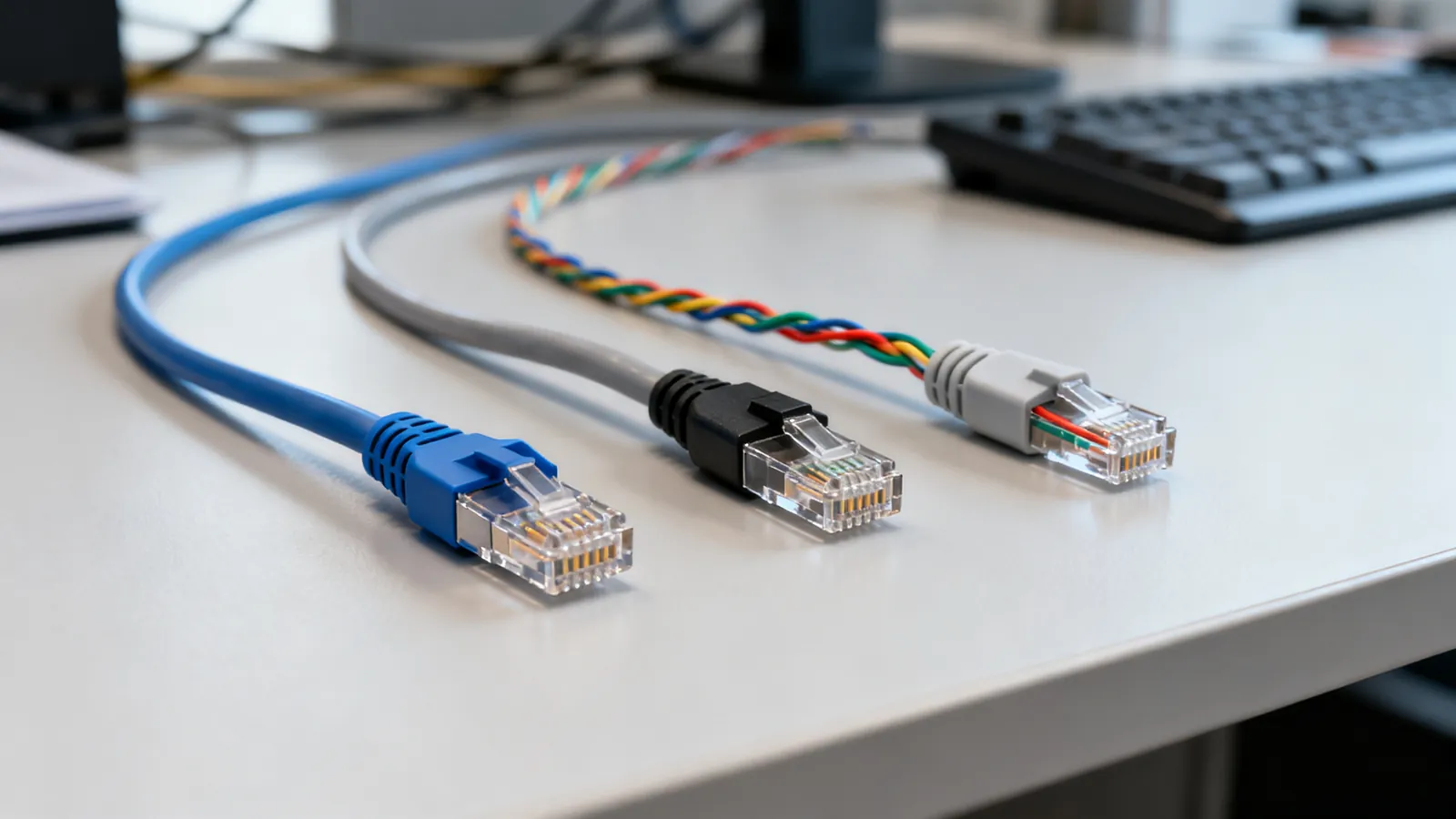
Cat5e, Cat6 and Cat6a all use the same RJ45-style 8P8C connector and the same T568 wiring, and all three carry Gigabit Ethernet to 100 m (328 ft). The difference is headroom: Cat5e is rated to 100 MHz, Cat6 to 250 MHz and Cat6a to 500 MHz, and that headroom decides how far each one will carry 10GBASE-T. For a new run where 10 Gbps might be needed later, Cat6a is the safe choice; for a short patch or a voice link, Cat5e is still perfectly adequate.
What each category actually supports
| Category | Rated bandwidth | 1 Gbps | 10 Gbps | Typical use |
|---|---|---|---|---|
| Cat5e | 100 MHz | 100 m (328 ft) | Not specified | Existing home and office runs, short patches |
| Cat6 | 250 MHz | 100 m (328 ft) | 55 m (180 ft), as little as 37 m (121 ft) when bundled | New runs where 10 Gbps may be needed at short reach |
| Cat6a | 500 MHz | 100 m (328 ft) | 100 m (328 ft) | New backbone and long 10 Gbps runs |
Cat5e also supports 2.5GBASE-T to 100 m under IEEE 802.3bz, and 5GBASE-T is specified over Cat6 to 100 m but runs on many Cat5e installations. Cat6 is not faster than Cat5e for Gigabit; both do 1 Gbps to the full 100 m. Cat6 only pulls ahead when you move to 10GBASE-T, and then only over shorter distances.
The 100 m channel is not one cable. It is up to 90 m (295 ft) of permanent link in the wall plus up to 10 m (33 ft) of patch and equipment cords. That limit applies to every speed from 10 Mbps to 10 Gbps on the matching category, and it is set by signal loss and timing rather than by the connector. The full rules are on the maximum Ethernet cable length page.
When Cat5e is still enough
Cat5e is the right answer when the link will never need more than 1 Gbps, or when 2.5 Gbps is the realistic ceiling. A home office, a printer, a voice over IP phone, a camera that only needs 100 Mbps, or a patch cord between a wall port and a laptop are all fine on Cat5e. It is also the cheapest copper to buy and to terminate, and it is already installed in a great many buildings.
Cat5e is not the right answer for a new run that might later carry 10GBASE-T over more than a short distance. If the cable is going inside a wall, the cost of the cable is small compared with the cost of opening the wall again. In that situation, install Cat6 or Cat6a once.
When Cat6 is the sensible middle
Cat6 gives you 250 MHz of headroom and 10GBASE-T up to 55 m (180 ft), or as little as 37 m (121 ft) where many cables run bundled together and alien crosstalk becomes the limiting factor. In a typical home or small office, most runs are shorter than 55 m, so Cat6 will often carry 10 Gbps even though it is not specified to the full 100 m.
Cat6 is also the category that 5GBASE-T is specified over to 100 m, which makes it a good match for 2.5G and 5G multi-gigabit ports. If the run is short and the budget is tight, Cat6 is a reasonable compromise. If the run is long, or if you cannot predict how many cables will be bundled together, Cat6a removes the doubt.
When Cat6a is worth it
Cat6a is rated to 500 MHz and carries 10GBASE-T to the full 100 m (328 ft). It is the category to choose for a new horizontal cabling installation where 10 Gbps is the target, for backbone links between a patch panel and a switch, and for any run that is longer than the Cat6 10 Gbps limit. Cat6a is also the category that gives the most margin against alien crosstalk when many cables are bundled in a tray or conduit.
The trade-off is physical. Cat6a is thicker and stiffer than Cat5e or Cat6, with a larger bend radius and a heavier pull. It is harder to terminate, and the patch panels and jacks cost more. The cable itself is not the main expense in a new installation; the labour, the containment and the terminations are. That is why the usual advice is to decide the category once, before the cable goes in.
Shielded or unshielded
Most Cat5e and Cat6 installations are U/UTP: unshielded twisted pair. Cat6a is often sold as F/UTP or S/FTP, with a foil around all pairs or a braid overall plus foil on each pair. A shielded cable only helps if the whole channel is shielded: shielded jacks, shielded plugs, shielded patch panels and grounding through the equipment. A shield that is broken or not grounded gives no benefit and can pick up noise. The differences are set out on the shielded vs unshielded Ethernet page.
For most home and small-office runs, unshielded Cat6 or Cat6a is the simpler choice. Shielded cable is worth considering where the cable must run close to machinery, radio transmitters or other strong noise sources, and where the grounding can be done properly.
Conductors, jackets and the parts that are not the cable
Category cable is solid or stranded copper. Solid copper is for horizontal runs that are punched into jacks and panels; stranded copper is for patch cords that flex. Cat5e is commonly 24 AWG, Cat6 23 or 24 AWG, and Cat6a 23 AWG; patch cords run from 24 to 26 AWG, and slim patch cords are 28 AWG, which TIA-568.2-D permits for patch cords. Copper-clad aluminium does not meet TIA category standards: it has higher resistance, is brittle when flexed and runs hotter under PoE. It should never carry PoE.
In the US, cable fire rating matters as much as category. CMP is plenum rated for air-handling spaces, CMR is riser rated for vertical runs between floors, CM or CMG is general purpose, and CMX is for limited residential use. A higher rating can replace a lower one, so CMP can go anywhere CMR can. In the EU, fire performance is classed under the Construction Products Regulation with Euroclasses such as Eca, Dca, Cca and B2ca, and LSZH jackets are common. Outdoor cable needs a UV-resistant jacket, and direct-burial cable is gel-filled or flooded; indoor cable is not rated for either.
What goes wrong
The most common mistake is assuming that a category label guarantees a speed. A Cat6 cable that is terminated badly, or that uses CCA conductors, will not meet the Cat6 limits. A Cat6a cable with a broken shield performs no better than unshielded cable. The only way to prove a link meets Cat6 or Cat6a is a certification tester that measures insertion loss, near-end crosstalk and return loss against the TIA category limits. A simple continuity tester will find opens, shorts and reversed pairs, but it will not find a split pair, where a wire is swapped between two pairs; that passes continuity and fails at speed.
Termination discipline matters. The pair untwist at a termination should be no more than 13 mm (0.5 in) for Cat5e and higher. The installed bend radius for 4-pair UTP should be at least four times the cable’s outside diameter, and the maximum pulling tension is 25 lbf (110 N). Pulling too hard or bending too tightly changes the geometry of the pairs and degrades the link.
Separation from mains power is another limit. The NEC asks for at least 50 mm (2 in) between communications cable and mains power conductors unless a barrier separates them, and power cables should be crossed at a right angle. Mains work itself is a job for a licensed electrician.
Finally, the connector. The “RJ45” used in Ethernet is properly an 8P8C modular connector. Plugs for solid conductors and plugs for stranded conductors use different contacts, and shielded cable needs shielded plugs. TIA recommends factory-made patch cords, because field crimping is where most faults are introduced. If you are choosing between categories for a specific job, the wider comparison of Ethernet cable categories covers Cat7, Cat7A and Cat8 as well.
Choosing in practice
For a new run in a home or small office where 1 Gbps is the target and 10 Gbps is unlikely, Cat5e or Cat6 is enough. For a new run where 10 Gbps is the target, or where the run is longer than 55 m, choose Cat6a. For a short patch cord, buy the category that matches the port and the run; a Cat6a patch cord on a Cat5e link does no harm, but it does not raise the link’s performance. For a link that must carry 10 Gbps to the full 100 m, Cat6a is the only one of the three that is specified to do it.
If the cable is already in the wall and it is Cat5e, do not replace it just because a faster switch is available. Test the link first. Many Cat5e installations will run 2.5GBASE-T to 100 m, and some will run 5GBASE-T. If the link is short and the equipment supports it, 10GBASE-T may work over Cat5e, but it is not a specified combination and it should be verified rather than assumed.
Common questions
Is Cat6 faster than Cat5e?
For Gigabit Ethernet, no: both Cat5e and Cat6 carry 1 Gbps to 100 m (328 ft). Cat6 is rated to 250 MHz against Cat5e's 100 MHz, and that extra headroom lets it carry 10GBASE-T up to 55 m (180 ft), or as little as 37 m (121 ft) when many cables are bundled. Cat5e is not specified for 10GBASE-T at all.
Do I need Cat6a for 10 Gigabit?
Cat6a is the only one of the three specified for 10GBASE-T to the full 100 m (328 ft). Cat6 will often do 10 Gbps over shorter runs, but the distance depends on length and on how many cables are bundled together. If the run is long, or if you want the link to meet the standard, choose Cat6a.
Is Cat5e or Cat6 better for a home?
For a home where the fastest link will be 1 Gbps, Cat5e is enough and is cheaper to buy and terminate. If the cable is going inside a wall and you may want 10 Gbps later, Cat6 or Cat6a is the better choice, because replacing in-wall cable later costs far more than the cable itself.
Can I mix Cat5e and Cat6 on the same network?
Yes. A channel runs at the speed its slowest component supports, so a Cat6 patch cord on a Cat5e permanent link gives you a Cat5e channel. Mixing categories does no harm, but it does not raise the performance of the link.
Does Cat6a need shielded cable?
No. Unshielded Cat6a exists and meets the category limits. Shielded Cat6a only helps if the jacks, plugs, patch panels and grounding are all part of the shielded system. A shield that is broken or not grounded gives no benefit and can pick up noise.
Read next
Cat7 and Cat8 Cables: What They Are and Who Needs Them
Cat7 is ISO-only with GG45 or TERA connectors; Cat8 is a 30 m data-centre cable. Learn what each standard says and what to buy for home or office.
Ethernet Cable Categories: Cat5e to Cat8
Ethernet cable categories compared: Cat5e, Cat6, Cat6a, Cat7 and Cat8 rated frequency, speed and distance, plus which to buy for home, office and 10 Gbps.
Fiber Connector Types: LC, SC, ST, MPO, UPC vs APC
Compare LC, SC, ST and MPO fiber connectors, and learn why UPC and APC polish must never be mated. Includes cleaning and selection advice.